Microsoft Copilot Basic
Duration: 1 Day Practical Training Program
The challenge is no longer simply “How do we introduce AI?” The practical business question is: “How do we help employees use the Copilot capabilities already available to them to improve the work they already do?”
This one-day program is designed for professionals who already understand their functional
domain—Finance, HR, Administration or Procurement—and want to learn how Microsoft Copilot can help them work faster, structure information, analyze data, draft and refine business communication, and create management-ready outputs.
Core philosophy: Participants do not need another course on Finance, HR, Admin or Procurement. They need to learn how to combine their existing professional judgement with Copilot to reduce repetitive work and improve the speed and quality of everyday deliverables.
Important Licensing & Feature Scope
Microsoft’s current licensing distinguishes Copilot Chat from licensed Microsoft 365 Copilot experiences. Copilot Chat is automatically included with eligible Microsoft 365 subscriptions, while work-based chat and some deeper Microsoft 365 capabilities depend on the applicable Copilot license and tenant configuration. Microsoft also states that Copilot Chat in Word, Excel and PowerPoint requires a Microsoft 365 Copilot (Basic) or (Premium) label in the current experience.
Accordingly, this program is intentionally scoped around the Basic experience requested for the workshop. Exact screens, menus and available capabilities can vary by Microsoft 365 subscription, Copilot license, tenant configuration, admin policies and feature rollout status. Features that Microsoft identifies as requiring a Premium/add-on license are not positioned as part of the Basic program.
The program also treats Agents and generated artifacts carefully: participants will understand what is available in their environment, how to use enabled agent/file-generation experiences, and how to validate outputs rather than being promised functionality that may not be enabled for every tenant.
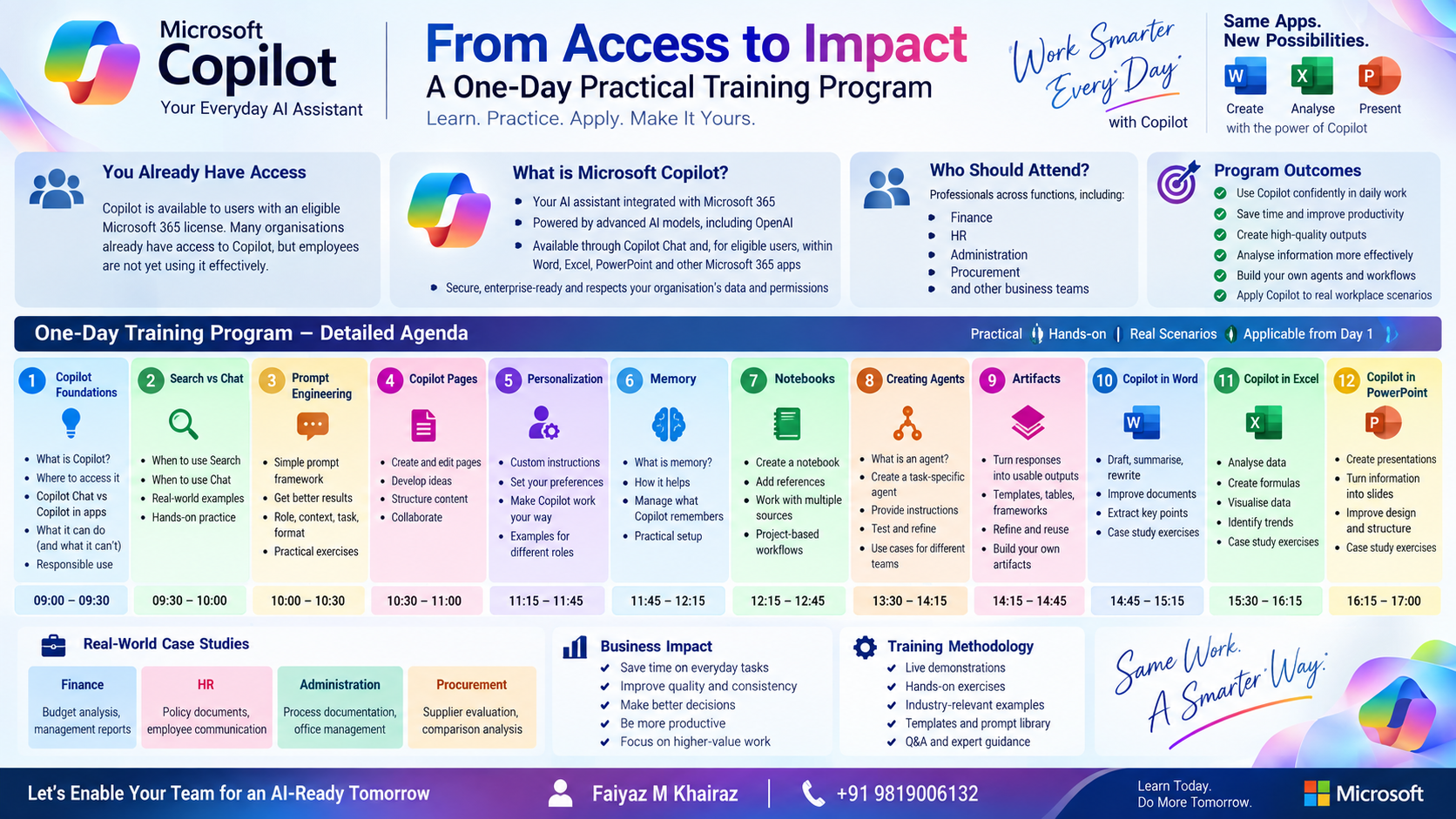
What Participants Will Learn
Participants will learn how to Find and organize relevant information using Copilot, while using structured prompts to Think through business problems and explore different options.
They will learn to Write professional communication, rewrite and summarize content, and adapt information for different audiences. Copilot can also help them Analyze spreadsheet data, identify trends, compare results and generate useful insights.
Participants will discover how to Create documents, tables, presentations and reusable business outputs from their requirements. They will also learn to Personalise Copilot using custom instructions and memory features for more consistent responses.
The training covers how to Organise information using Copilot Pages and Notebooks, creating a focused workspace for business tasks. Participants will also understand Automate / Delegate capabilities through agents and task-oriented Copilot features where available.
Finally, participants will learn to Validate AI-generated outputs by checking accuracy, completeness, confidentiality and overall business suitability before using them.
How Copilot Benefits Different Functions
- Finance
Copilot can support budget vs. actual analysis, variance explanations, financial summaries, management commentary, KPI analysis, report drafting and spreadsheet exploration. A practical workshop case study can focus on monthly management reporting and variance analysis. - HR
Copilot can help with policy summarisation, employee communication, onboarding content, interview and role documentation, HR data summaries and action lists. The workshop can use a new-joiner onboarding and HR policy communication case study. - Administration
Copilot can assist with correspondence, meeting summaries, process documentation, checklists, office and project coordination, and presentations. A practical case study can focus on turning meetings into clear actions and creating an administration checklist. - Procurement
Copilot can support RFQ requirement extraction, supplier comparison, purchase analysis, vendor communication, evaluation summaries and sourcing documentation. The workshop can include an RFQ comparison and supplier evaluation case study

The workshop repeatedly applies this workflow. Copilot is treated as a productivity assistant, not as the final decision-maker. Participants remain responsible for professional judgement, factual validation, confidentiality and approval of business outputs.
Module 1 – Copilot Foundations
Purpose: Build a practical understanding of Microsoft Copilot, where it fits into Microsoft 365, what Copilot Chat can do, and why prompt quality and context matter.
Topics covered-
- What is Microsoft Copilot?
- Copilot Chat and the role of context
- Web-based vs work-based chat
- Understanding the difference between AI assistance and human judgement
- Common mistakes: vague prompts, missing context, accepting outputs without checking
Practical business examples-
- Finance: “Summarise this month’s finance priorities into 5 management actions.”
- HR: “Turn this policy update into a one-page employee communication.”
- Procurement: “Convert this RFQ requirement into a structured checklist.”
Hands-on exercise: Exercise: Convert one routine task from the participant’s function into a structured Copilot request.
Business benefit: Participants understand where Copilot fits into their existing workflow and how to start with a business task rather than an AI experiment.
Module 2 – Search vs Chat
Purpose: Teach participants when to use Copilot for finding current information and when to use Chat for reasoning, drafting, transformation and analysis.
Topics covered-
- Search intent vs conversational intent
- Fact-finding vs synthesis
- Adding context and constraints
- Asking follow-up questions
- Checking sources and assumptions
Practical business examples.
- Finance: Research an accounting/market topic and create a short briefing.
- HR: Find current information about a statutory/process requirement, then convert it into an internal checklist.
- Procurement: Research a supplier/category and prepare a comparison framework.
Hands-on exercise: Exercise: Run the same business question through search-oriented and chat-oriented approaches; compare the outputs.
Business benefit: Better tool selection, better questions and less time spent manually collecting and restructuring information.
Module 3 – Prompt Engineering for Business
Purpose: Move from simple questions to reliable, repeatable business prompts.
Topics covered-
- Role + task + context + data + constraints + output format
- Tone and audience
- Step-by-step prompting
- Examples and templates
- Critique/refine loops
- Prompt patterns for analysis, summarisation and communication
Practical business examples
- Finance: “Act as a management reporting analyst…”
- HR: “Act as an HR operations specialist…”
- Procurement: “Act as a sourcing analyst…”
- Admin: “Act as an executive administration coordinator…”
Hands-on exercise: Exercise: Build a reusable prompt for a real recurring task.
Business benefit: Participants create prompts they can reuse after the workshop instead of relying on trial and error.
Module 4 – Copilot Pages
Purpose: Turn a useful Copilot response into a working page that can be refined, expanded and shared.
Topics covered-
- Chat → Page workflow
- Building structured content
- Adding tables, plans and other rich content
- Refining content with Copilot
- Editing and collaborating
- Converting a Page into Word or PowerPoint where supported
Practical business examples
- Finance: Build a management commentary page.
- HR: Build an onboarding guide.
- Procurement: Build a supplier evaluation summary.
- Admin: Build an event/meeting action page.
Hands-on exercise: Exercise: Create a one-page business brief from a Copilot response.
Business benefit: Participants learn to move from a disposable chat response to an editable business work product.
Module 5 – Personalization
Purpose: Configure Copilot to respond more consistently to the participant’s preferred style, format andworking approach.
Topics covered-
- Custom instructions
- Preferred writing style
- Response structure
- Tone and audience
- When personalization helps—and when to keep instructions task-specific
Practical business examples
- Finance: Always present management analysis with Executive Summary, Key Variances, Drivers and Actions.
- HR: Use professional, neutral and employee-friendly language.
- Procurement: Use concise supplier-comparison tables.
Hands-on exercise: Exercise: Create and test a function-specific custom instruction.
Business benefit: More consistent first drafts and less repetitive prompting.
Module 6 – Memory
Purpose: Understand Copilot Memory and how remembered preferences can make future interactions more relevant.
Topics covered-
- What Copilot Memory does
- How memory differs from custom instructions
- When to use memory
- Temporary chat and situations where personalization should not be used
- Reviewing and managing remembered information
Practical business examples
- Finance: Remember preferred reporting structure.
- HR: Remember communication style for employee notices.
- Admin: Remember preferred meeting-summary format.
Hands-on exercise: Exercise: Give Copilot a safe, non-sensitive preference and test the difference in a later conversation.
Business benefit: Participants learn how personalization can improve continuity while retaining control over what is remembered.
Module 7 – Copilot Notebooks
Purpose: Create a focused AI workspace around a defined topic, project or business task.
Topics covered-
- What Copilot Notebooks are
- Adding relevant references
- Grounding responses in selected content
- Notebook instructions
- Summarizing and comparing source material
- Using notebooks for ongoing work
Practical business examples
- Finance: Quarterly business review notebook.
- HR: Policy/project notebook.
- Procurement: RFQ and supplier documentation notebook.
- Admin: Event/project coordination notebook.
Hands-on exercise: Exercise: Create a notebook, add a small set of workshop files, define instructions and generate a grounded summary.
Business benefit: Participants learn to keep related information together and ask questions against a controlled set of references.
Module 8 – Creating &Using Agents
Purpose: Introduce agent-based work and teach participants to recognise the difference between a general
Copilot conversation and a task-oriented agent.
Topics covered-
- What is an agent?
- Agent vs Chat
- Task-specific instructions
- Inputs, outputs and boundaries
- Examples of repetitive business tasks
- What is available in the organisation’s tenant
Practical business examples
- Finance: Management-reporting assistant concept.
- HR: Policy Q&A / onboarding assistant concept.
- Procurement: RFQ checklist assistant concept.
- Admin: Event-planning assistant concept.
Hands-on exercise: Exercise: Design an agent concept on paper/prompt first; then test available agent capabilities in the tenant where enabled.
Business benefit: Participants understand agent thinking without assuming that every agent capability is available in every license or tenant.
Module 9 – Artifacts & Reusable Outputs
Purpose: Use Copilot to create structured outputs such as tables, charts, plans, checklists and other rich content, especially within Pages and supported experiences.
Topics covered-
- What counts as a useful AI-generated artifact/output
- Tables and structured content
- Charts/visual elements where supported
- Turning analysis into an editable deliverable
- Quality control and refinement
- Moving from output to Word/PowerPoint/Excel
Practical business examples
- Finance: KPI table + variance commentary.
- HR: onboarding checklist + communication draft.
- Procurement: supplier comparison table.
- Admin: event tracker and action list.
Hands-on exercise: Exercise: Convert a messy business request into a structured management-ready output.
Business benefit: Participants learn to ask for usable deliverables instead of generic prose.
Module 10 – Copilot in Word
Purpose: Use Copilot to create, transform, summarise and refine professional documents.
Topics covered-
- Drafting from a brief
- Summarising long documents
- Rewriting for audience and tone
- Extracting actions and key points
- Improving structure
- Turning analysis into management communication
Practical business examples
- Finance: Monthly performance commentary.
- HR: Policy circular / onboarding guide.
- Procurement: Supplier evaluation note.
- Admin: SOP or meeting report.
Hands-on exercise: Exercise: Create a one-page professional document from structured notes.
Business benefit: Faster document creation with better structure and audience alignment.
Module 11 – Copilot in Excel
Purpose: Use Copilot to interrogate and work with spreadsheet data and convert analysis into actionable insight.
Topics covered-
- Understanding data context and table structure
- Ask questions about data
- Identify trends and patterns
- Summarise results
- Explain variances
- Generate formulas or analytical suggestions where supported
- Create charts/visualisations where available
- Validate outputs before using them
Practical business examples
- Finance: Budget vs Actual / monthly KPI analysis.
- HR: Headcount, attrition or training analysis.
- Procurement: Spend and supplier analysis.
- Admin: Cost/event tracking.
Hands-on exercise: Exercise: Analyse a prepared business dataset and produce 5 management insights plus an action list.
Business benefit: Participants move from manually scanning spreadsheets to asking structured analytical questions.
Module 12 – Copilot in PowerPoint
Purpose: Convert information into a clear presentation and improve an existing deck.
Topics covered-
- Create presentation structure
- Summarise slide content
- Rewrite slide bullets
- Generate speaker/audience preparation questions
- Improve narrative flow
- Generate or refine visuals where available
- Review for executive clarity
Practical business examples
- Finance: Monthly/quarterly management review.
- HR: HR initiative update.
- Procurement: Supplier strategy presentation.
- Admin: Project/event update.
Hands-on exercise: Exercise: Turn a one-page business brief into a short management presentation.
Business benefit: Participants learn to move from information to executive communication more quickly.

I have attended the advanced excel workshop on the 19th and 20th of December 2020. Everything you need to know about excel in two days, can be found through this workshop. Got a lot ideas and answers to age old doubts. Mr. Faiyaz is a very good teacher for the same. Every technical description was made so simple to understand with great examples. Thankyou sir.

Carol Monteiro

I have attended the Advanced Excel training sessions organised by Sealed Air Packaging Materials India LLP on 15th and 16th December 2020. The sessions conducted by Mr. Faiyaz were very informative, interactive and hand-on despite having a virtual training platform. I would highly recommended this for anybody who wants to enhance their excel skills.
Sampada Munj

The 3 day workshop taught me what i couldn't learn in a span of a year. The way excel is been taught makes you learn the basics and understand the functions and features instead of memorizing things. A big thumbs up to Faiyaz Khairaz for taking the session.
Nitesh Oberoi

Amazing training. I was able to prepare excel dashboards for my organization with their teachings and methods. Even my doubts were solved. Special thanks to Sabiha ma'am and Shaziya ma'am for their training.
Harsh Malhotra

Did a Excel Workshop Course with Faiyaz M Khairaz sir. It was an excellent course for girl like me who had no prior experience with Excel. Sir cleared each and every doubt I had. Thank You Sir for the wonderful training.
Geeta Pansare